
Hyundai Sonata LF: Rear Parking Assist System / Rear Parking Assist System Switch Repair procedures
| Removal |
| 1. |
Disconnect the negative (-) battery terminal. |
| 2. |
Remove the console upper cover.
(Refer to Body - "Floor Console Assembly") |
| 3. |
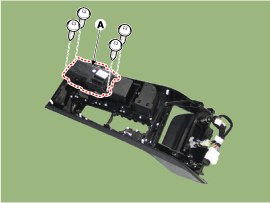
Remove the rear curtain switch (A) after loosening the mounting screws.
|
| Installation |
| 1. |
Install the switch assembly in the console upper cover. |
| 2. |
Install the console upper cover. |

 Back View Camera System
Components and Components Location Component Location 1. Back view camera2. AVN monitor Schematic Diagrams Circuit Diagram Description and Operation Description Back view camera will activate when the backup light is ON with the ignition switch ON and the shift lever in the R position...
Other information:
Hyundai Sonata LF 2014-2019 Service Manual: Side Impact Sensor (SIS) Description and Operation
Description Side Impact Sensor (SIS) system consists of two P-SIS which are installed at each center of the front door module (LH and RH) and two SIS which are installed at each center pillar nearby (LH and RH). Side Pressure Sensor is also called P-SIS because it detects pressure due to collision at its mounting location...
Hyundai Sonata LF 2014-2019 Service Manual: Receiver-Drier Repair procedures
Replacement 1. Remove the condenser. 2. Remove the cap (B) on the bottom of the condenser with a L wrench [Hex 14] (A). Tightening torque : 4.0 ± 1.0 N.m (0.41 ± 0.1 kgf.m, 2.95 ± 0.72 lbf-ft) 3. Remove the receiver-drier (A) from condenser using a long nose plier...
Categories
- Manuals Home
- Hyundai Sonata Owners Manual
- Hyundai Sonata Service Manual
- Engine Control / Fuel System
- Suspension System
- Engine Mechanical System
- New on site
- Most important about car
