
Hyundai Sonata LF: Audio / Audio Unit Components and Components Location
Hyundai Sonata LF 2014-2019 Service Manual / Body Electrical System / Audio / Audio Unit Components and Components Location
| Components |
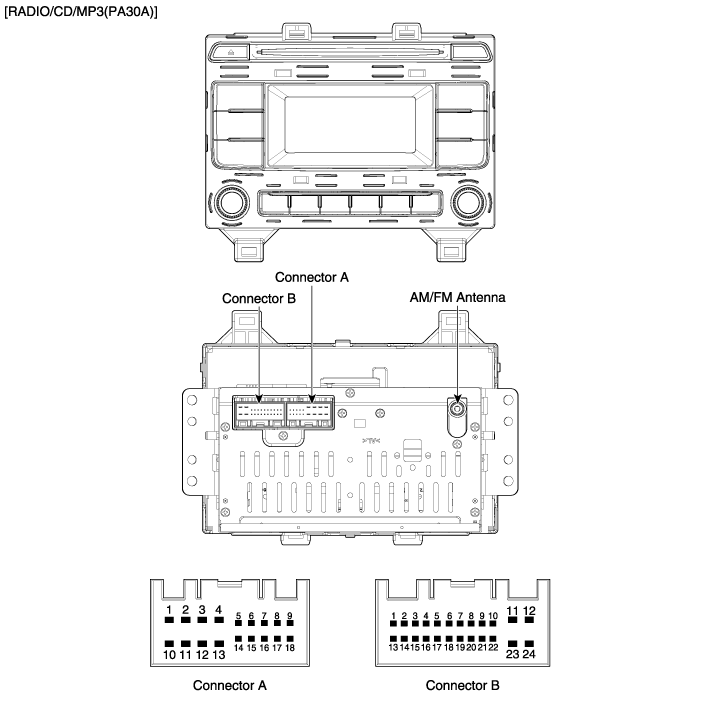
Connector Pin Information
| No | Connector A | Connector B |
| 1 | Rear left speaker (+) | CAN High |
| 2 | Front left speaker (+) | - |
| 3 | Front right speaker (+) | - |
| 4 | Rear right speaker (+) | Steering wheel remote |
| 5 | - | - |
| 6 | - | USB D (+) |
| 7 | - | USB VDD |
| 8 | Illumination (+) | AUX R IN |
| 9 | Detent | AUX GND |
| 10 | Rear left speaker (-) | Mic (+) B/T |
| 11 | Front left speaker (-) | ACC |
| 12 | Front right speaker (-) | B+ |
| 13 | Rear right speaker (-) | CAN Low |
| 14 | - | - |
| 15 | - | - |
| 16 | - | Speed |
| 17 | Illumination (-) | Remote GND |
| 18 | Remote antenna | USB D (-) |
| 19 | USB GND | |
| 20 | AUX DETECT | |
| 21 | AUX L IN | |
| 22 | Mic (-) B/T | |
| 23 | - | |
| 24 | Power GND |
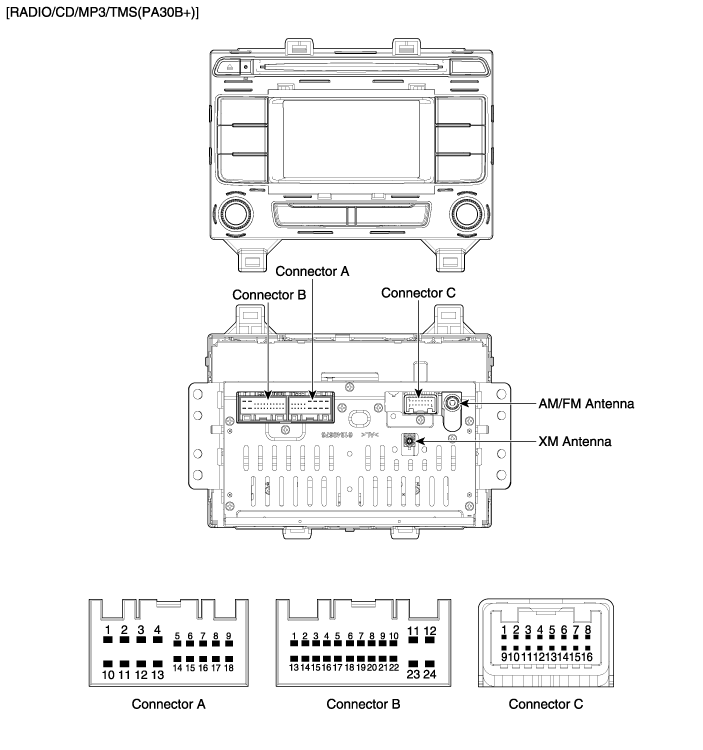
Connector Pin Information
| No | Connector A | Connector B | Connector C |
| 1 | Rear left speaker (+) | CAN High | - |
| 2 | Front left speaker (+) | TMU audio (+) | - |
| 3 | Front right speaker (+) | - | Camera ground |
| 4 | Rear right speaker (+) | Steering wheel remote | Camera video input |
| 5 | - | - | - |
| 6 | - | USB D (+) | - |
| 7 | - | USB VDD | - |
| 8 | Illumination (+) | AUX R IN | - |
| 9 | - | AUX GND | - |
| 10 | Rear left speaker (-) | Mic (+) B/T | Camera battery (+) |
| 11 | Front left speaker (-) | ACC | Parking ground |
| 12 | Front right speaker (-) | B+ | R detector |
| 13 | Rear right speaker (-) | CAN Low | - |
| 14 | - | TMU audio (-) | - |
| 15 | - | Auto light | - |
| 16 | - | Speed | - |
| 17 | Illumination (-) | Remote GND | |
| 18 | Remote antenna | USB D (-) | |
| 19 | USB GND | ||
| 20 | AUX DETECT | ||
| 21 | AUX L IN | ||
| 22 | Mic (-) B/T | ||
| 23 | - | ||
| 24 | Power GND |
 Components and Components Location
Component Location 1. Audio unit2. Midrange speaker3. Center speaker4. Glass antenna amplifier5. Front door speaker6. Rear door speaker7. Woofer speaker (Option)8...
 Audio Unit Repair procedures
Removal 1. Disconnect the negative (-) battery terminal. 2. Remove the cluster fascia upper panal. (Refer to Body - "Cluster Fascia Upper Panel") 3...
Other information:
Hyundai Sonata LF 2014-2019 Service Manual: Heater & A/C Control Unit (Manual) Repair procedures
Replacement 1. Disconnect the negative (-) battery terminal. 2. Using a screwdriver or remover, remove the center fascia panel (A). 3. Disconnect the A/C & heater controller connectors (A). 4. Remove the heater and A/C controller (A) from the center facia panel...
Hyundai Sonata LF 2014-2019 Service Manual: Door Scuff Trim Components and Components Location
C..
Categories
- Manuals Home
- Hyundai Sonata Owners Manual
- Hyundai Sonata Service Manual
- Transmission Gear Oil General Information
- DCT (Dual Clutch Transmission) System
- Cooling System
- New on site
- Most important about car

Copyright В© 2026 www.hsonatalf.org