
Hyundai Sonata LF: Audio / Audio Unit Repair procedures
Hyundai Sonata LF 2014-2019 Service Manual / Body Electrical System / Audio / Audio Unit Repair procedures
| Removal |
| 1. |
Disconnect the negative (-) battery terminal. |
| 2. |
Remove the cluster fascia upper panal.
(Refer to Body - "Cluster Fascia Upper Panel") |
| 3. |
Remove the audio head unit (A) after loosening the screws.
|
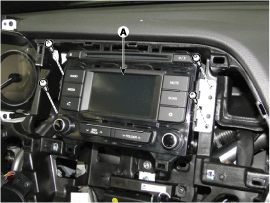
| 4. |
Remove the audio head unit after disconnecting the connectors and cable (A).
|
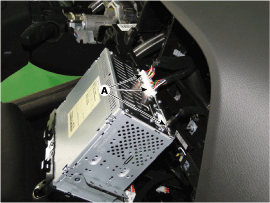

| Installation |
| 1. |
Connect the audio unit connectors and cable. |
| 2. |
Install the audio head unit. |
| 3. |
Install the cluster fascia upper panel. |
| 4. |
Connect the negative (-) battery terminal.
|

 Speakers Repair procedures
Inspection 1. Troubleshooting for Speaker (1) Basic inspection of speaker Inspect the sound from speaker after verifying that the speaker mounting screws is removed and the wiring connector is connected precisely to remove vibration transmitted from body trims and surrounding parts...
Other information:
Hyundai Sonata LF 2014-2019 Service Manual: Condenser Components and Components Location
C..
Hyundai Sonata LF 2014-2019 Service Manual: Crankshaft Position Sensor (CKPS) Troubleshooting
Waveform This example shows a typical Crankshaft Position Sensor(CkPS) and Camshaft Position Sensor(CMPS) waveform at idle.The PCM controls the injection and ignition timing by using these signals. Generally CkPS signal is used to detect the piston's position and CMPS signal is used to detect the Top Dead Center of each cylinder...
Categories
- Manuals Home
- Hyundai Sonata Owners Manual
- Hyundai Sonata Service Manual
- Transmission Gear Oil General Information
- Transmission Gear Oil Repair procedures
- Driveshaft and axle
- New on site
- Most important about car

Copyright В© 2026 www.hsonatalf.org