
Hyundai Sonata LF: Lubrication System / Oil Pump Repair procedures
Hyundai Sonata LF 2014-2019 Service Manual / Engine Mechanical System / Lubrication System / Oil Pump Repair procedures
| Removal and Installation |
| 1. |
Remove the timing chain cover.
(Refer to Timing System - "Timing Chain Cover") |
| 2. |
Remove the pump cover (A).
|
| 3. |
Remove the inner rotor (B) and outer rotor (C).
|
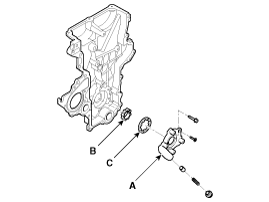
| 4. |
Install in the reverse order of removal. |

 Oil Pressure Switch Repair procedures
Removal and Installation 1. Remove the under cover. 2. Remove the oil drain plug, and drain the oil into a container. 3. Remove the oil pressure switch (A)...
Other information:
Hyundai Sonata LF 2014-2019 Service Manual: Auto Lighting Control System
Specifications Specifications ItemsSpecificationsRated voltage5VLoadMax. 1mA (Relay load)Illuminations (LUX)501.42 ± 0.31V1002.63 ± 0.58V1503.84 ± 0.84V Components and Components Location Component Location 1. Auto light sensor2. Head lamps3...
Hyundai Sonata LF 2014-2019 Service Manual: Shift Cable Components and Components Location
C..
Categories
- Manuals Home
- Hyundai Sonata Owners Manual
- Hyundai Sonata Service Manual
- Body (Interior and Exterior)
- DCT (Dual Clutch Transmission) System
- Engine Mechanical System
- New on site
- Most important about car

Copyright © 2026 www.hsonatalf.org