
Hyundai Sonata LF: Audio / Multimedia Jack Repair procedures
Hyundai Sonata LF 2014-2019 Service Manual / Body Electrical System / Audio / Multimedia Jack Repair procedures
| Removal |
| 1. |
Disconnect the battery (-) terminals. |
| 2. |
Remove the floor console assembly.
(Refer to Body - "Floor Console Assembly") |
| 3. |
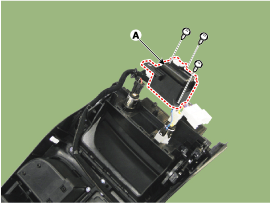
Remove the multimedia jack (A) after disconnect the connector and loosening the mounting screws.
|
| Installation |
| 1. |
Connect the multimedia jack connector. |
| 2. |
Install the multimedia jack. |
| 3. |
Install the floor console assembly. |
 Multimedia Jack Description and Operation
Description The multimedia jack on the console upper cover is for customers who like to listen to external portable music players like the MP3 etc...
 AVN System
..
Other information:
Hyundai Sonata LF 2014-2019 Service Manual: External AMP Components and Components Location
C..
Hyundai Sonata LF 2014-2019 Service Manual: Front Wiper Motor Repair procedures
Removal 1. Disconnect the negative (-) battery terminal. 2. If necessary, release the wiper blade fixing clip by pulling up and remove the wiper blade from the inside radius of wiper arm. 3. Remove the cowl top cover. (Refer to Body - "Cowl Top Cover") 4...
Categories
- Manuals Home
- Hyundai Sonata Owners Manual
- Hyundai Sonata Service Manual
- Body Electrical System
- Brake System
- Engine Mechanical System
- New on site
- Most important about car

Copyright В© 2026 www.hsonatalf.org