
Hyundai Sonata LF: AVN System / Mic Repair procedures
| Inspection |
| 1. |
Disconnector the negative (-) battery terminal. |
| 2. |
Remove the overhead console. |
| 3. |
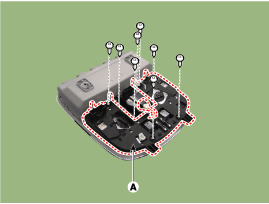
Remove the overhead console cover after loosening the screws.
|
| 4. |
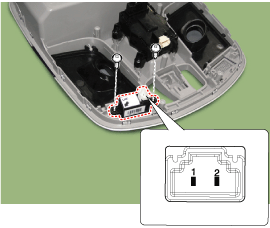
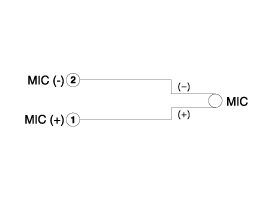
Check the continuity of between terminals.
|
 AUX jack Repair procedures
Removal 1. Disconnect the battery (-) terminals. 2. Remove the floor console assembly. (Refer to Body - "Floor Console Assembly") 3. Remove the multimedia jack (A) after disconnect the connector and loosening the mounting screws...
 BLUE LINK
..
Other information:
Hyundai Sonata LF 2014-2019 Service Manual: Power Window Switch Description and Operation
Description System Diagram Driver Door Module (DDM) Driver Door Module (DDM) is part of CAN configuration, communicating with BCM, SMK, SJB, PSM, and ADM via CAN while performing wired signal I/Os with safety power windows. Operate the buttons of DDM located on the inner side of the driver door to perform any functions related to power windows, electric mirror, and door lock/unlock...
Hyundai Sonata LF 2014-2019 Service Manual: Fuel Filler Cap Description and Operation
Description A ratchet tightening device on the threaded fuel filler cap reduces the chances of incorrect installation, which would seal the fuel filler. After the gasket on the fuel filler cap and the filler neck flange contact each other, the ratchet produces a loud clicking noise indicating the seal has been set...
Categories
- Manuals Home
- Hyundai Sonata Owners Manual
- Hyundai Sonata Service Manual
- Brake System
- Cylinder Head Cover Repair procedures
- Engine Control / Fuel System
- New on site
- Most important about car
