Hyundai Sonata LF: Indicators And Gauges / Instrument Cluster Description and Operation
Communication Network Diagram
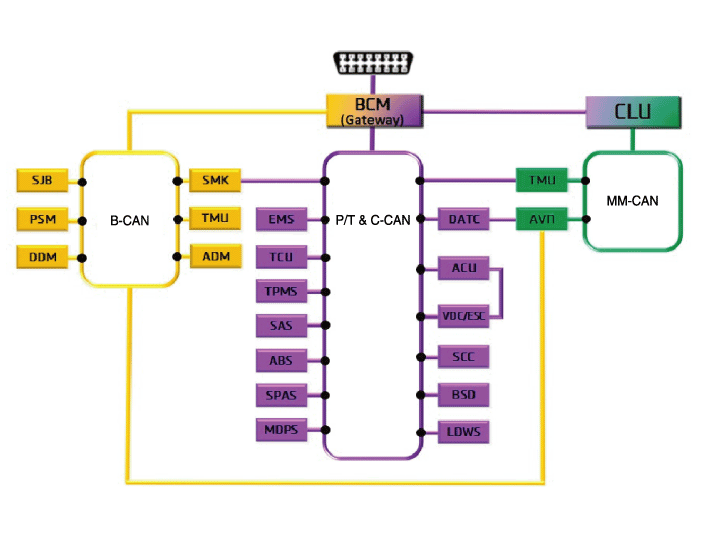
Abbreviation
| Expalnation
|
ACU
| Airbag Control Unit
|
ADM
| Assist Door Module
|
B_CAN
| Body Controller Area Network
|
BCM
| Body Control Module
|
BSD
| Blind Spot Detection
|
C_CAN
| Chassis Controller Area Network
|
CLU
| Cluster Module
|
DATC
| Dual Automatic Temp Control
|
DDM
| Driver Door Module
|
ESC
| Electronic Stability Program
|
EMS
| Engine Management System
|
LDWS
| Lane Departure Warning System
|
M_CAN
| Multi media Controller Area Network
|
MDPS
| Motor Driven Power Steering
|
P_CAN
| Powertrain Controller Area Network
|
PSM
| Power Seat Module
|
SAS
| Steering Angle Sensor
|
SJB
| Smart Junction Block
|
SMK
| Smart Key Unit
|
SPAS
| Smart Parking Assist System
|
TCU
| Transmission Control Unit
|
TPMS
| Tire Pressure Monitoring System
|
VDC
| Vehicle Dynamic Control
|
TMU
| Telematics System
|
ABS
| Anti-lock Brake System
|
SCC
| Smart Cruise Control
|
Cluster Variant Coding
As we have more options (ESC, MDPS, SCC, etc.) in the car,
the dashboard now have more information to display depending on the
chosen options.
For this reason, we need to learn which options the current vehicle when we replace the dashboard.
To address this issue, a course of learning based on the
option required for the vehicle when replacing the dashboard should be
carried out.
This is called Variant Coding.
Function
| 1. |
High speed CAN communication (C-CAN)
| A. |
Custom Function : Boarding interlocking sheets, Welcome Light |
| B. |
LDWS : Lane Departure Warning System |
| C. |
SPAS: Smart Parking Assist System |
|
| 2. |
Low speed CAN communication (MM-CAN)
| A. |
AV : Audio / Video Multimedia information Display |
| B. |
TBT : Turn By Turn Navigation Information Display |
|
| 3. |
Sound output
Instrument cluster and the external speakers connected to the output of the various beeps and sound effects.
If External AMP is applied, the directional alarm is outputted through the amp. 
Sound
| Description and function (CAN data receiver)
| Welcome
| Welcome (Key out and door open/closed state checked by BCM)
| Goodbye
| Goodbye (Cluster)
| Door Open warning
| Kwy reminder warning (BCM), Vehicle speed is 5km/h or below
& IGN switch is ACC or IGN or engine start & when vehicle speed
is below 5 km/h or when the driver side door is opened
| Seat belt warning
| Driver seat belt warning (BCM)
| PAS System warning
| PAS sensor fault warning (BCM)
| Gear R
| PAS warning when shift gear R (BCM and SPAS)
| Parking Brake
| Parking brake warning (BCM)
| Start button
| SSB button warning (SMK)
| Rheostat light information
| Rheostat warning when select the max or min degree (Cluster)
| Smart Key departure
| Smart key out warning (SMK)
| N0n smart key warning (SMK)
| Smart Cruise
| Change from the conventional cruise to the smart cruise(SCC)
| Smart cruise driving information
| Smart cruise function cancel (SCC)
| conventional cruise
| Change from the smart cruise to the conventional cruise(SCC)
| Turn signal lamp (Tick)
| Turn signal lamp warning (BCM)
| Turn signal lamp (Tock)
| Turn signal lamp warning (BCM)
| Smart key battery low voltage
| Warnig when driver push the SSB button with low voltage battery smart key (SMK)
| EPB warning
| Warning when change from Auto Hold to EPB lock (EPB)
| Coolant temperature alarm
| When the engine temperature is over 120 °C (EMS)
|
|
| 4. |
User Setting Mode (USM)
Setting can be changed by using switchs (Menu, UP, Down and
OK button). There are many items (for example, In/Out Seat
Synchronization, In/Out Steering Wheel Synchronization, Auto Door Lock,
Auto Door Lock Deactivate, Head Lamp Escort, Welcome Light, Welcome
Sound, One Touch Turn Signal, Average Fuel Consumption Auto Reset,
Brightness, and Content Setup) that can be set and customized. The
signal flow during setting is as follows.
| (1) |
UMS settings are set, they are transmitted to BCM. |
| (2) |
BCM transmits the settings via B_CAN to the relevant modules. |
| (3) |
The module completes setting and transmits the modified setting to BCM. |
| (4) |
BCM transmits the final settings via C_CAN to the cluster.
|
The cluster communicates directly with C-CAN units. |
|
|
Removal
•
Put on gloves to protect your hands.
•
When prying with a flat-tip screwdriver, wrap it with
protective tape, and apply protective tape around the related parts, to
prevent damage...
Other information:
1. TCM Connector and Terminal Function
2. TCM Terminal Function
Connector [A]
PinDescriptionPinDescription1Clutch Actuator (Clutch Motor 1 (ODD)_Phase V)17-2Clutch actuator (Clutch Motor 2 (EVEN) Phase V)18Clutch Actuator (Clutch Motor 1 (ODD)_HALL 1)3Select Actuator (Shift Solenoid 2 (EVEN)_Ground)19Clutch Actuator (Clutch Motor 1 (ODD)_Supply)4Select Actuator (Shift Solenoid 1 (ODD) Push)20Select Actuator (Shift Solenoid 1 (ODD)_Sensor Supply)5Clutch Actuator (Clutch Motor 1 (ODD)_Phase U)21Select Actuator (Shift Solenoid 2 (EVEN)_Sensor Supply)6Clutch Actuator (Clutch Motor 2 (EVEN)_Phase U)22Select Actuator (Shift Solenoid 2 (EVEN)_Sensor Ouput)7Select Actuator (Shift Solenoid 1 (ODD)_Ground)23Clutch Actuator (Clutch Motor 2 (EVEN)_HALL 2)8Select Actuator (Shift Solenoid 2 (EVEN)_ Pull)24Clutch Actuator (Clutch Motor 2 (EVEN)_HALL 3)9Clutch Actuator (Clutch Motor1 (ODD)_Phase W)25Clutch Actuator (Clutch Motor 2 (EVEN)_Ground)10Clutch Actuator (Clutch Motor 2 (EVEN)_Phase W)26Select Actuator (Shift Solenoid 1 (ODD)_Sensor Output)11Select Actuator (Shift Solenoid 1 (ODD) Pull)27-12Select Actuator (Shift Solenoid 2 (EVEN) Push)28Clutch Actuator (Clutch Motor 2 (EVEN)_HALL 1)13Clutch Actuator (Clutch Motor 1 (ODD)_HALL 2)29Clutch Actuator (Clutch Motor 2 (EVEN)_Supply)14Clutch Actuator (Clutch Motor (ODD)_HALL 3)30Select Actuator (Select Solenoid 1 (ODD)_Sensor Ground)15Clutch Actuator (Clutch Motor 1 (ODD)_Ground)31Select Actuator (Select Solenoid 2 (EVEN)_Sensor Ground)16-32-
Connector [B]
PinDescriptionPinDescription1-35-2-36-3ON / START Input37-4Paddle Shift (Up) Switch signal38-5Inhibitor Switch "P" Input signal39-6Inhibitor Switch "R" Input signal40-7Inhibitor Switch "D" Input signal41Shift Actuator (Shift Motor 2 (EVEN) _HALL 2)8Sports mode "Down" shift42Shift Actuator (Shift Motor 2 (EVEN) _HALL 3)9Clutch Speed Sensor (EVEN) Ground43Inhibitor Switch "M" Input signal10-44CAN1 Communication Port1 High11-45CAN1 Communication Port1 Low12-46-13Shift Actuator (Shift Motor 1 (ODD) _HALL 2)47-14Shift Actuator (Shift Motor 1 (ODD) _HALL 3)48Flex ray High (BP)15-49Input Speed Supply 1 (ODD)16-50Input Speed Signal 1 (ODD)17Battery Power Low VBD 51-18Paddle Shift Down signal52-19Shift Lever Select Switch53-20Inhibitor Switch "N" Input signal54Shift Actuator (Shift Motor 2 (EVEN) _Supply)21Sports mode "Up" shift55Shift Actuator (Shift Motor 2 (EVEN) _HALL 1)22-56Shift Actuator (Shift Motor 2 (EVEN) _Sensor Ground)23Input Speed Supply 2 (EVEN)57Power Ground 1 for High Current Modules245V spare supply output58Power Ground 2 for High Current Modules25-59Shift Actuator (Shift Motor 2 (EVEN)_Phase W)26Shift Solenoid 1 Position Sensor Output60Shift Actuator (Shift Motor 1 (ODD)_Phase W)27Select Actuator (Shift Motor 1 (ODD)_HALL 1)61 Power Ground 3 for High Current Modules28Select Actuator (Shift Motor 1 (ODD)_Sensor Ground)62-29-63Shift Actuator (Shift Motor 2 (EVEN)_Phase V)30CAN2 Communication Port2 High64Shift Actuator (Shift Motor 1 (ODD)_Phase V)31CAN2 Communication Port2 Low65Motor Supply Voltage 1 from Direct Battery32-66Motor Supply Voltage 2 from Direct Battery33-67Shift Actuator (Shift Motor 2 (EVEN)_Phase U)34Flex ray bus, BM68Shift Actuator (Shift Motor 1 (ODD)_Phase U)
3...
Removal
Room Lamp (Non-Panorama Sunroof)
1.
Disconnect the negative (-) battery terminal.
2.
Using a screwdriver or remover, Separate the room lamp lens (A) from the room lamp.
-
Put on gloves to prevent hand injuries...



 Instrument Cluster Repair procedures