
Hyundai Sonata LF: Air Conditioning System / Condenser Repair procedures
Hyundai Sonata LF 2014-2019 Service Manual / Heating, Ventilation and Air Conditioning / Air Conditioning System / Condenser Repair procedures
| Inspection |
| 1. |
Check the condenser fins for clogging and damage. If clogged,
clean them with water, and blow them with compressed air. If bent,
gently bend them using a screwdriver or pliers. |
| 2. |
Check the condenser connections for leakage, and repair or replace it, if required.
|
| Replacement |
| [Theta 2.4 GDI] |
| 1. |
Recover the refrigerant with a recovery/ recycling/ charging station. |
| 2. |
Disconnect the negative (-) battery terminal. |
| 3. |
Remove the front bumper.
(Refer to Body - "Front Bumper Cover") |
| 4. |
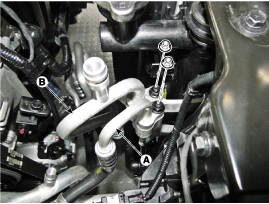
Remove the 2 nuts, and then disconnect the discharge line (A) and liquid line (B) from the condenser.
|
| 5. |
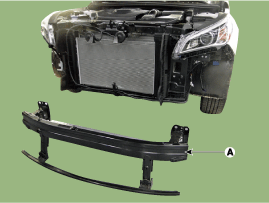
After loosening the mounting bolts and nuts, then remove the front bumper frame (A).
|
| 6. |
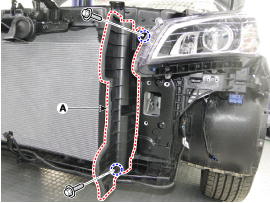
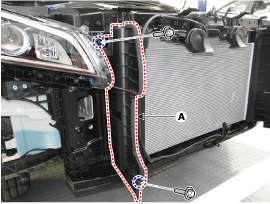
After loosening the mounting bolts, then remove the side air guard (A).
[LH]
[RH]
|
| 7. |
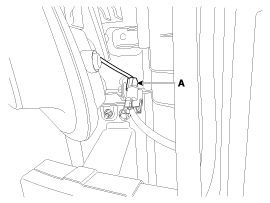
Remove the hood latch connected (A).
|
| 8. |
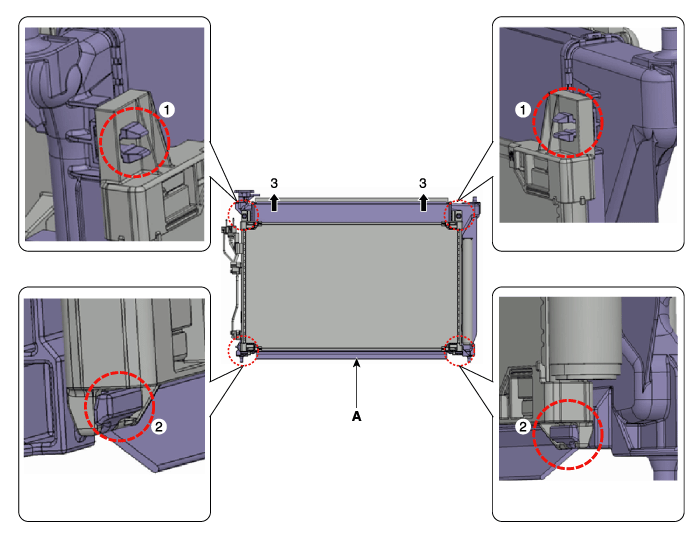
Remove the condenser (A) from radiator.
|
| 9. |
Install in the reverse order of removal.
|

[Gamma 1.6 T-GDI / Theta 2.0 T-GDI]
| 1. |
Recover the refrigerant with a recovery / recycling / charging station. |
| 2. |
Disconnect the negative (-) battery terminal. |
| 3. |
Remove the front bumper.
(Refer to Body - "Front Bumper Cover") |
| 4. |
Remove the 2 nuts, and then disconnect the discharge line (A) and liquid line (B) from the condenser.
|
| 5. |
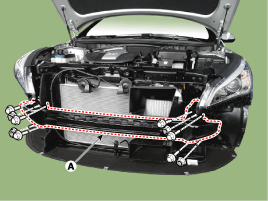
After loosening the mounting bolts and nuts, then remove the front bumper frame (A).
|
| 6. |
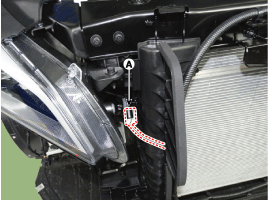
Disconnect the hood latch connector (A) and then remove the wiring mounting clips.
|
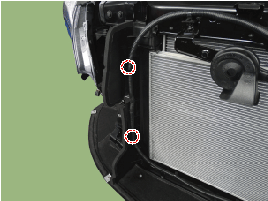
| 7. |
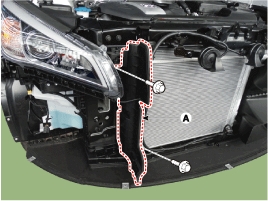
After loosening the mounting bolts, then remove the side air guard (A).
|
| 8. |
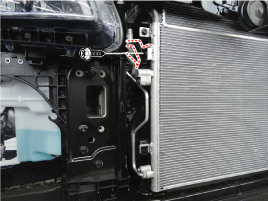
Loosen the condenser bracket mounting bolt.
|
| 9. |
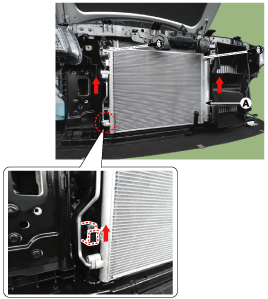
Loosen the mounting bolts and then remove the condenser (A) from radiator.
|
| 10. |
Install in the reverse order of removal.
|

 Receiver-Drier Repair procedures
Replacement 1. Remove the condenser. 2. Remove the cap (B) on the bottom of the condenser with a L wrench [Hex 14] (A). Tightening torque : 4...
Other information:
Hyundai Sonata LF 2014-2019 Service Manual: Sub Frame Repair procedures
Replacement 1. Raise the vehicle, and make sure it is securely supported. 2. Remove the wheel cap (A). Be careful not to damage to the wheel cap (A) when removing the it. 3. Remove the front wheel and tire (A) from front hub...
Hyundai Sonata LF 2014-2019 Service Manual: Panorama Sunroof Assembly Repair procedures
Removal • In order to remove the panorama sunroof assembly, use the tools shown in the following figure: [Tooling Diagram] Square wire Insert-type wire grip [Tooling Assembly Diagram] • Insert and affix square wire into the insert hole of the wire grip ...
Categories
- Manuals Home
- Hyundai Sonata Owners Manual
- Hyundai Sonata Service Manual
- Engine Electrical System
- Repair procedures
- DCT (Dual Clutch Transmission) System
- New on site
- Most important about car

Copyright © 2026 www.hsonatalf.org