
Hyundai Sonata LF: Audio / Audio Remote Control (Sonata Sports) Repair procedures
Hyundai Sonata LF 2014-2019 Service Manual / Body Electrical System / Audio / Audio Remote Control (Sonata Sports) Repair procedures
| Inspection |
| 1. |
Check for resistance between terminals in each switch position (LH).
[LH : Audio + Hands free]
|
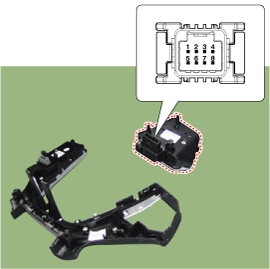
| 2. |
Check for resistance between terminals in each switch position (RH).
[RH : Audio + Hands free]
|
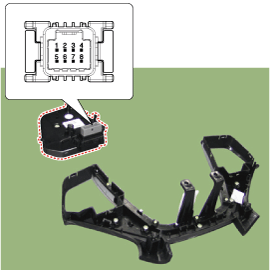
| Removal |
| 1. |
Disconnect the negative (-) battery terminal. |
| 2. |
Remove the steering wheel assembly.
(Refer to Steering System - "Steering Wheel") |
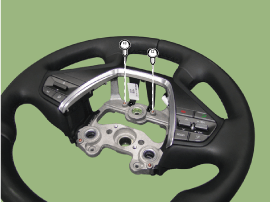
| 3. |
Remove the screw from the steering cover.
|
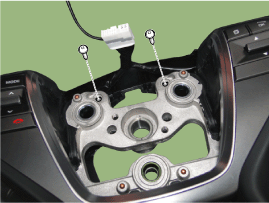
| 4. |
Remove the steering back cover (A).
|
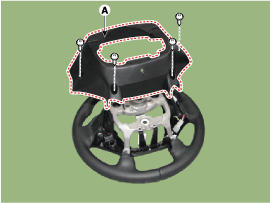
| 5. |
Remove the steering remote control connector (A).
|
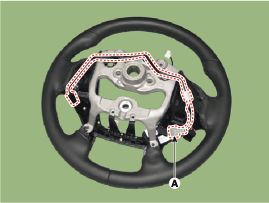
| 6. |
Remove the steering remote control (A) after loosening the screws.
|
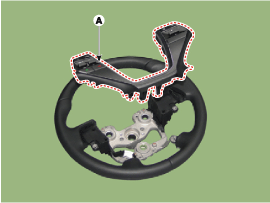
| Installation |
| 1. |
Install the steering wheel remote control after connecting the connector. |
| 2. |
Connect the negative (-) battery terminal. |


Other information:
Hyundai Sonata LF 2014-2019 Service Manual: Steering Gear box Repair procedures
Removal 1. Raise the vehicle, and make sure it is securely supported. 2. Remove the wheel cap (A). Be careful not to damage to the wheel cap(A) when removing the it. 3. Remove the front wheel and tire (A) from front hub...
Hyundai Sonata LF 2014-2019 Service Manual: Special Service Tools
Special Service Tools Tool(Number and Name)IllustrationUse09200-3N000Engine support fixture(Beam)Removal and installation of the transaxle.Use this beam (SST No. : 09200-3N000) with the supporter (SST No. : 09200-2S000).?Permit operating with 09200-38001...
Categories
- Manuals Home
- Hyundai Sonata Owners Manual
- Hyundai Sonata Service Manual
- DCT (Dual Clutch Transmission) System
- Brake System
- General Information
- New on site
- Most important about car

Copyright © 2026 www.hsonatalf.org