
Hyundai Sonata LF: Front Door / Front Door Window Glass Repair procedures
Hyundai Sonata LF 2014-2019 Service Manual / Body (Interior and Exterior) / Front Door / Front Door Window Glass Repair procedures
| Replacement |
| 1. |
Remove the front door trim.
(Refer to Front Door - "Front Door Trim") |
| 2. |
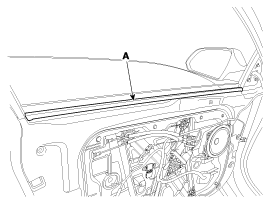
After loosening the mounting screws, then remove the front door belt inside weatherstrip (A).
|
| 3. |
By operating the power window switch, fall down until seeing the glass mounting bolt on plug hole.
|

| 4. |
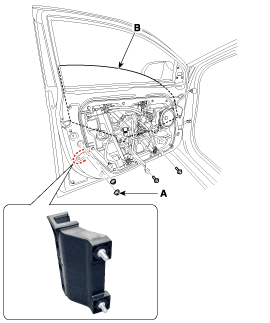
Loosen the mounting nuts (A) of the front door lower channel. |
| 5. |
Loosen the mounting bolt and pull up the front door window glass (B) while tilting.
|
| 6. |
Removal is the reverse of the installation.
|


Other information:
Hyundai Sonata LF 2014-2019 Service Manual: Instrument Cluster Components and Components Location
C..
Hyundai Sonata LF 2014-2019 Service Manual: Battery Sensor Description and Operation
Description Vehicles have many control units that use more electricity. These units control their own system based on information from diverse sensors. It is important to have a stable power supply as there diverse sensors giving a variety of information...
Categories
- Manuals Home
- Hyundai Sonata Owners Manual
- Hyundai Sonata Service Manual
- Brake System
- General Information
- Engine Mechanical System
- New on site
- Most important about car

Copyright © 2026 www.hsonatalf.org