
Hyundai Sonata LF: Rear Parking Assist System / Parking Assist Sensor Repair procedures
Hyundai Sonata LF 2014-2019 Service Manual / Body Electrical System / Rear Parking Assist System / Parking Assist Sensor Repair procedures
| Removal |
| 1. |
Disconnect the negative (-) battery terminal. |
| 2. |
Remove the front/rear bumper cover.
(Refer to Body - "Front Bumper Cover")
(Refer to Body - "Rear Bumper Cover") |
| 3. |
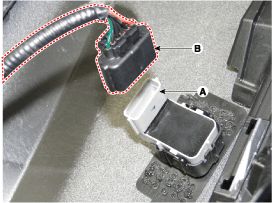
Disconnect the connector (B) from the parking assist sensor (A).
|
| 4. |
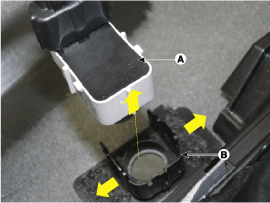
Pull out the front sensor (A) by opening the sensor holder (B) out.
|
| 5. |
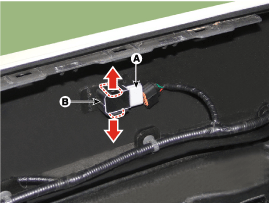
Pull out the rear sensor (A) by opening the sensor holder (B) out.
|
| Installation |
| 1. |
Install the rear ultra sensor after connecting the connector. |
| 2. |
Install the bumper cover. |
| 3. |
Connect the negative (-) battery terminal. |


Other information:
Hyundai Sonata LF 2014-2019 Service Manual: Components and Components Location
Components 1. Front door inside handle cap2. Front door pull cap3. Front door trim4. Front door module5. Front door quadrant inner cover6. Front door lower channel7. Front door panel8. Front door belt inner weatherstrip9. Front door body outside weatherstrip10...
Hyundai Sonata LF 2014-2019 Service Manual: Idler Components and Components Location
C..
Categories
- Manuals Home
- Hyundai Sonata Owners Manual
- Hyundai Sonata Service Manual
- Transmission Gear Oil Repair procedures
- DCT (Dual Clutch Transmission) System
- Body Electrical System
- New on site
- Most important about car

Copyright В© 2026 www.hsonatalf.org