
Hyundai Sonata LF: Blind Spot Detection system / Blind Spot Detection Unit Repair procedures
Hyundai Sonata LF 2014-2019 Service Manual / Body Electrical System / Blind Spot Detection system / Blind Spot Detection Unit Repair procedures
| Removal |
| 1. |
Disconnect the negative (-) battery terminal. |
| 2. |
Remove the rear bumper.
(Refer to Body - "Rear Bumper") |
| 3. |
Remove the BSD unit (A) after loosening the mounting nuts.
|
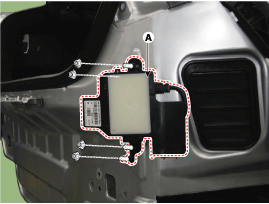
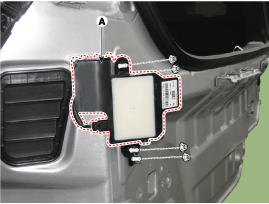

| Installation |
| 1. |
Install the BSD units to the rear bumper. |
| 2. |
Install the rear bumper. |
| 3. |
Connect the negative (-) battery terminal.
|


Other information:
Hyundai Sonata LF 2014-2019 Service Manual: Power Door Mirrors
Components and Components Location Component Location 1. Power door mirror2. Power door mirror switch3. Power folding mirror switch Power Door Mirror Switch Components and Components Location Components Power Door Mirror Switch Schematic Diagrams Circuit Diagram Power Door Mirror Switch Repair procedures Inspection [Power Window Module (IMS)] 1...
Hyundai Sonata LF 2014-2019 Service Manual: Front Door Latch Repair procedures
Replacement 1. Remove the front door module. (Refer to Front Door - "Front Door Module") 2. To remove the front door outside handle base connector (A), widen both sides of the lock pins in the direction of the arrow and then push back the front door outside handle base connector...
Categories
- Manuals Home
- Hyundai Sonata Owners Manual
- Hyundai Sonata Service Manual
- Engine Control / Fuel System
- Heating, Ventilation and Air Conditioning
- Transmission Gear Oil General Information
- New on site
- Most important about car

Copyright В© 2026 www.hsonatalf.org